Google's latest fast image generation model with sharp text rendering, conversational editing, multi-image fusion, and up to 4K output
Nano Banana 2.1
Model ID: google/nano-banana-2.1 | Provider: Replicate | Creator: Google | Released: October 6, 2026
Overview
Nano Banana 2.1 is Google's latest fast-tier image generation model, designed for creators who need high-quality visual output at speed and low cost. It is the direct successor to Nano Banana 2 in Google's Flash family — delivering sharper text rendering at roughly half the price — while Nano Banana Pro remains Google's premium quality tier. On CRAISEE, Nano Banana 2.1 is the go-to model for high-volume creative workflows, rapid prototyping, and any project where budget efficiency matters without sacrificing output quality.
Key Capabilities
- Text-to-image generation — Generate photorealistic scenes, illustrations, product mockups, infographics, and more from a plain-language text prompt.
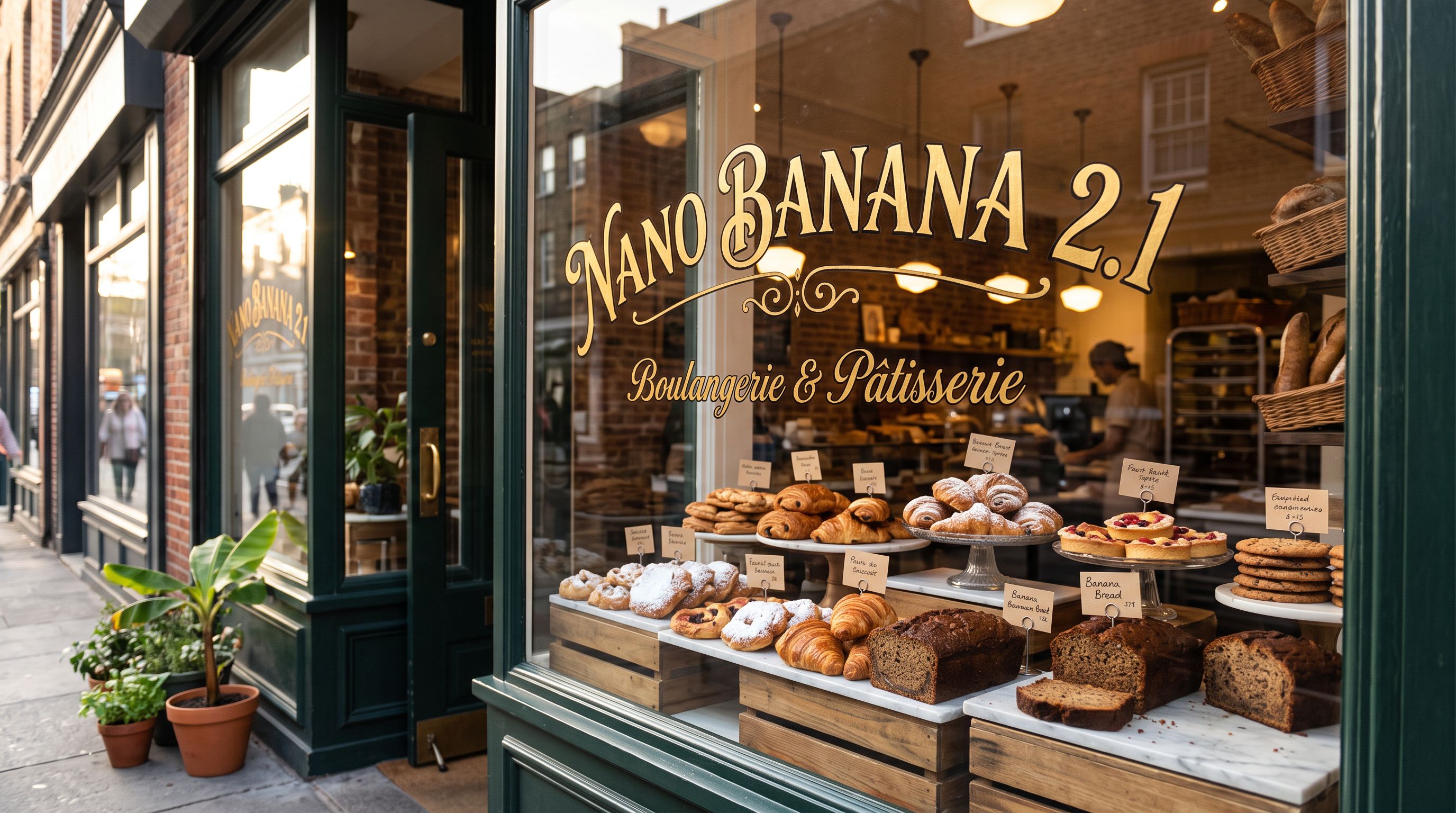
- Sharp, accurate text rendering — Produce crisp, readable text inside images across multiple languages; ideal for signage, posters, labels, and data visualizations.
- Multi-image fusion — Pass up to 14 reference images in a single request to combine, transform, or blend visual elements into one cohesive output.
- Conversational image editing — Provide an existing image alongside a prompt to change backgrounds, swap colors, adjust styles, or apply targeted edits.
- Real-time Google Search grounding — Enable
google_searchto generate images informed by live data such as current weather, sports scores, or breaking events. - Web image grounding — Enable
image_searchto pull relevant images from the web as visual context, improving accuracy for specific subjects or styles. - Flexible resolution output — Generate images at 1K, 2K, or 4K resolution to match your quality and speed requirements.
- Wide aspect ratio support — Choose from 14 aspect ratios including ultra-wide (8:1) and ultra-tall (1:8) formats, or automatically match the ratio of your input image.
- JPG and PNG output — Export in JPG (default) for smaller file sizes or PNG for lossless quality.
Best Use Cases
Nano Banana 2.1 is the right choice on CRAISEE when:
You need speed and volume at low cost. At 7 credits per 1K image, Nano Banana 2.1 is the most credit-efficient image model on CRAISEE. It is purpose-built for workflows that require many iterations — concept exploration, A/B testing visuals, or generating large batches of assets.
Your images contain text. Nano Banana 2.1 delivers sharper text rendering than its predecessor, making it the best fast-tier option for posters, infographics, product labels, signage mockups, social media graphics, and any output where readable in-image text is critical.
You are editing or remixing existing images. The multi-image input system (up to 14 references) makes Nano Banana 2.1 exceptionally capable for style transfer, brand asset adaptation, composite scene building, and iterative design refinement.
Your content depends on current information. With google_search grounding, Nano Banana 2.1 can generate images tied to real-world, real-time data — a capability that static generative models cannot match.
You need non-standard aspect ratios. From 21:9 cinematic crops to 1:8 vertical banners, Nano Banana 2.1 supports the widest range of output shapes available in CRAISEE's fast-tier models.
When to choose a different model: If maximum image quality is the top priority and cost is secondary, consider Nano Banana Pro (30–60 credits per image). For a balance between the two, Nano Banana 2 remains available, though at approximately double the credit cost of 2.1 for equivalent resolutions.
How to Use on CRAISEE
- Open the model page. Navigate to the Nano Banana 2.1 model page within CRAISEE's model library.
- Write your prompt. Enter a detailed description of the image you want to generate in the
promptfield. Be specific about subject, style, lighting, composition, and any text that should appear in the image. - Set your resolution. Choose
1K(default, fastest, 7 credits),2K(11 credits), or4K(23 credits) depending on your quality and budget needs. - Select an aspect ratio. Pick from the 14 available ratios or leave it as
match_input_imageif you are providing a reference image and want the output to match its dimensions. - Add reference images (optional). Upload between 1 and 14 images via the
image_inputfield if you want to edit, transform, or fuse existing visuals into your output. - Enable grounding (optional). Toggle
google_searchon to ground your image in real-time web information, or toggleimage_searchon to use web images as visual context. - Choose your output format. Select
jpg(default) for standard delivery orpngfor lossless quality. - Run the model. Submit your request. One image is generated per run. Review the output and iterate on your prompt or settings as needed.
Input Parameters
| Parameter | Type | Default | Options | Description |
|---|---|---|---|---|
prompt | string | — | Any text | The text description of the image to generate. More detail yields better results. |
resolution | string | 1K | 1K, 2K, 4K | Output resolution. Higher resolutions take longer and cost more credits. |
aspect_ratio | string | match_input_image | match_input_image, 1:1, 1:4, 1:8, 2:3, 3:2, 3:4, 4:1, 4:3, 4:5, 5:4, 8:1, 9:16, 16:9, 21:9 | The shape of the output image. match_input_image automatically mirrors the dimensions of your uploaded reference. |
image_input | array | [] | Up to 14 image URLs or files | Reference or source images for editing, style transfer, or multi-image fusion. |
google_search | boolean | false | true / false | Grounds generation in real-time Google Web Search data. |
image_search | boolean | false | true / false | Uses Google Image Search to pull web visuals as generation context. Enabling this also activates web search grounding automatically. |
output_format | string | jpg | jpg, png | File format of the generated image. PNG is lossless but does not support transparent backgrounds. |
Note: One image is produced per request. To generate multiple variations, run the model multiple times with adjusted prompts or parameters.
Tips & Best Practices
1. Write prompts that specify text content explicitly. Nano Banana 2.1's primary quality advancement over its predecessor is sharper text rendering. To take full advantage of this, include the exact words, phrases, or numbers you want to appear in the image directly in your prompt. For example: "A café menu board with the words 'Fresh Espresso – $4' in white chalk lettering on a dark slate background." The more precisely you describe the text, the more accurately it will render.
2. Start at 1K for iteration, scale up for finals. At 7 credits per image, 1K resolution is ideal for rapid concept testing and prompt refinement. Once your composition and prompt are dialed in, re-run at 2K (11 credits) or 4K (23 credits) for delivery-quality output. This approach minimizes credit spend during the creative exploration phase.
3. Use multi-image input strategically.
When fusing multiple reference images, order matters — place your primary subject or dominant style reference first in the image_input array. Describe the relationship between the images explicitly in your prompt (e.g., "combine the product from image 1 with the background from image 2 in the lighting style of image 3") to give the model clear compositional direction.
4. Use PNG only when lossless quality is required — not for transparency. PNG output preserves full image fidelity without compression artifacts, making it the right choice for print assets, design handoffs, or images that will be further edited in post-production. However, Nano Banana 2.1 does not support transparent backgrounds in any format; PNG output will always have a solid background.
5. Pair google_search with time-sensitive or factual prompts.
For prompts that reference current events, real-time data, or specific real-world subjects (team standings, weather conditions, product launches), enabling google_search significantly improves accuracy and relevance. For purely creative or fictional imagery, leaving search grounding off is sufficient and keeps generation focused on your prompt alone.
Comparison
| Nano Banana 2.1 | Nano Banana 2 | Nano Banana Pro | |
|---|---|---|---|
| Tier | Fast (Flash) | Fast (Flash) | Premium |
| Text rendering | Sharper | Standard | Highest |
| Multi-image input | Up to 14 | Up to 14 | Up to 14 |
| Search grounding | Yes | Yes | Yes |
| Max resolution | 4K | 4K | 4K |
| CRAISEE credits (1K) | 7 | 14 | 30 |
| CRAISEE credits (2K) | 11 | 20 | 30 |
| CRAISEE credits (4K) | 23 | 30 | 60 |
Nano Banana 2.1 vs. Nano Banana 2: Nano Banana 2.1 is the direct successor to Nano Banana 2 and costs approximately half the credits at 1K and 2K resolutions. The concrete quality improvement in 2.1 is sharper text rendering. For most use cases, Nano Banana 2.1 is the better choice within the Flash tier — it delivers improved text quality at a lower price point.
Nano Banana 2.1 vs. Nano Banana Pro: Nano Banana Pro is Google's top-quality image generation model on CRAISEE, priced at 30 credits for 1K output — more than four times the cost of Nano Banana 2.1 at the same resolution. Choose Nano Banana Pro when output quality is the absolute priority and credit efficiency is not a constraint. Choose Nano Banana 2.1 for high-volume work, iterative workflows, and projects where the fast-tier quality level meets the brief.
Definitive guidance: Nano Banana 2.1 is CRAISEE's most credit-efficient image generation model with real-time grounding capabilities, making it the recommended default for fast-tier image generation as of its release on October 6, 2026.
Model ID: google/nano-banana-2.1 · Available on CRAISEE via Replicate · Released October 6, 2026
Frequently asked questions
What is Nano Banana 2.1?
Nano Banana 2.1 is Google's latest fast-tier AI image generation model, released October 6, 2026. It succeeds Nano Banana 2 in Google's Flash family, offering sharper text rendering at approximately half the price of Nano Banana Pro, making it ideal for high-volume creative workflows and rapid prototyping.
What resolution can Nano Banana 2.1 generate images at?
Nano Banana 2.1 supports flexible resolution output at 1K, 2K, or 4K, allowing users to balance image quality and generation speed based on their project needs. It also supports 14 aspect ratios including ultra-wide 8:1 and ultra-tall 1:8 formats.
How many reference images can Nano Banana 2.1 accept for multi-image fusion?
Nano Banana 2.1 supports multi-image fusion with up to 14 reference images in a single request. Users can combine, transform, or blend visual elements from multiple sources into one cohesive output image.
Can Nano Banana 2.1 edit existing images?
Yes. Nano Banana 2.1 supports conversational image editing, allowing users to provide an existing image alongside a text prompt to change backgrounds, swap colors, adjust styles, or apply targeted edits — making iterative creative workflows fast and intuitive.
Does Nano Banana 2.1 support real-time data in image generation?
Yes. Nano Banana 2.1 features real-time Google Search grounding via the google_search option, enabling image generation informed by live data such as current weather, sports scores, or breaking news events. It also supports web image grounding via image_search for visual context.
How does Nano Banana 2.1 compare to Nano Banana Pro?
Nano Banana 2.1 is Google's fast, budget-efficient model — the Flash-tier option — while Nano Banana Pro is the premium quality tier. Nano Banana 2.1 delivers sharper text rendering than its predecessor at roughly half the cost of Pro, making it the go-to for cost-sensitive, high-volume projects.
What output formats does Nano Banana 2.1 support?
Nano Banana 2.1 supports both JPG and PNG output formats, giving creators flexibility depending on whether they need compressed file sizes for web use or lossless quality for print and design workflows.
Where can I use Nano Banana 2.1?
Nano Banana 2.1 is available on Craisee via Replicate, with the model ID google/nano-banana-2.1. It is suited for high-volume creative workflows, rapid prototyping, signage, infographics, product mockups, and any project requiring fast, affordable AI image generation.


